Site tutorials · Tutorial 18 of 27
Put the dosing table on your calendar
Dosing table to calendar… lays a profile's dosing table onto real dates, then saves it as a calendar file or copies it as a checklist.
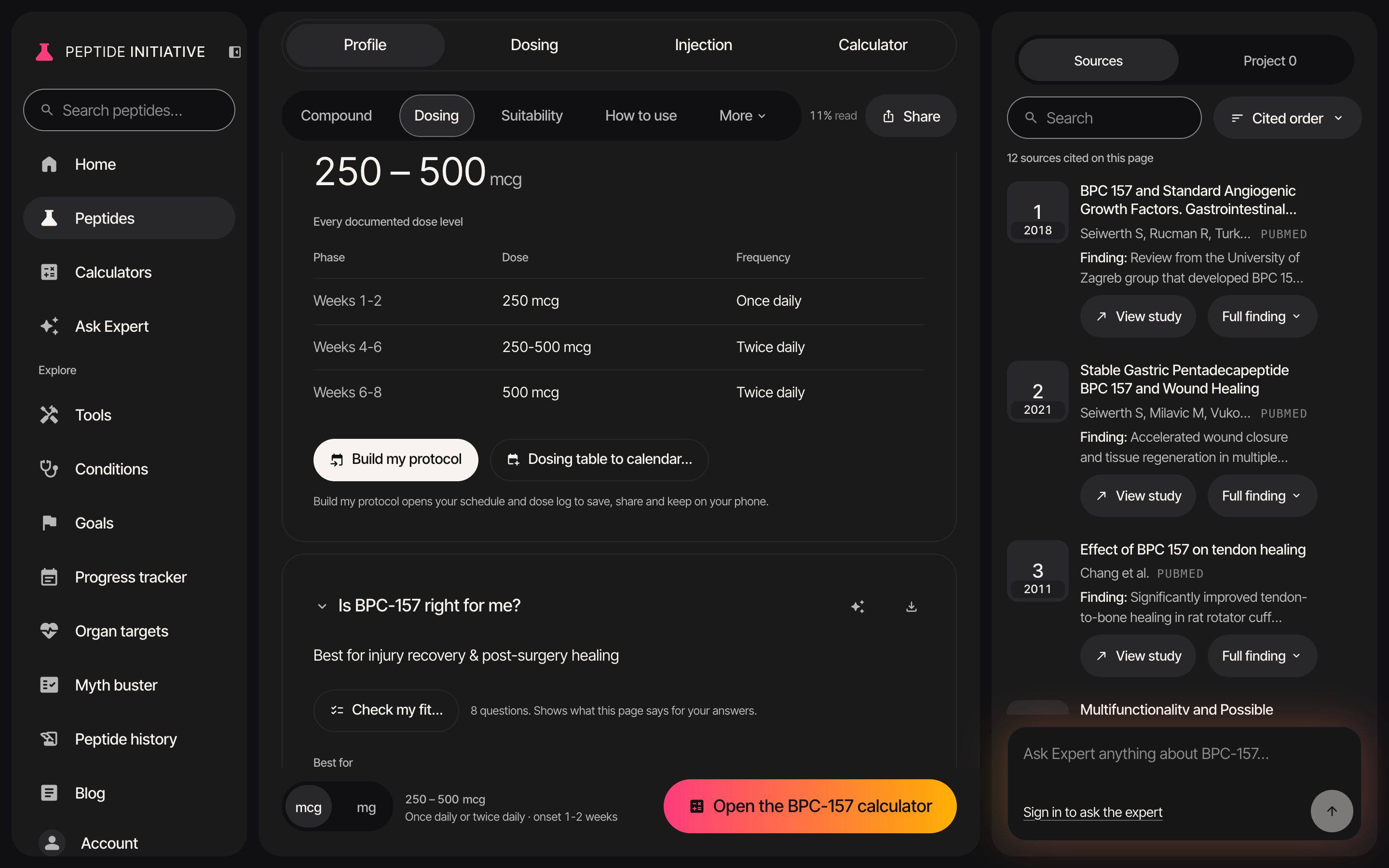
Dosing table to calendar
- 1Press Dosing in the section bar — on a phone, press More, then Dosing
- 2Every documented dose level is in the dosing table
- 3Under it, press Dosing table to calendar…
- 4The table's rows, laid onto dates — starting today
- 5Change the start date and every date moves with it
- 6Notes from the table point out weeks it skips or lists twice
- 7Press Add to calendar — it saves a calendar file. Open it to add each phase to your calendar
- 8Copy checklist copies the phases and their dates as a tick list
- 9Back to dosing returns to the table
Watch
Dosing table to calendar
BPC-157's dosing table on a start date a week out.
Good to know
- Only rows whose phase names a week range (such as Weeks 1-2) get dates. Any other row is listed with No dates in the table.
- The calendar file has one all-day event per dated phase, with the dose and how often in its title.
- Build my protocol, beside it, is a different tool: it opens the calculator's schedule and dose log to save and keep on your phone.