Site tutorials · Tutorial 3 of 27
Plan your schedule and dose log
Under each peptide's calculator, a sample schedule lays out the documented doses day by day — with a dose log to tick, and a copy to print, send, or add to your calendar.
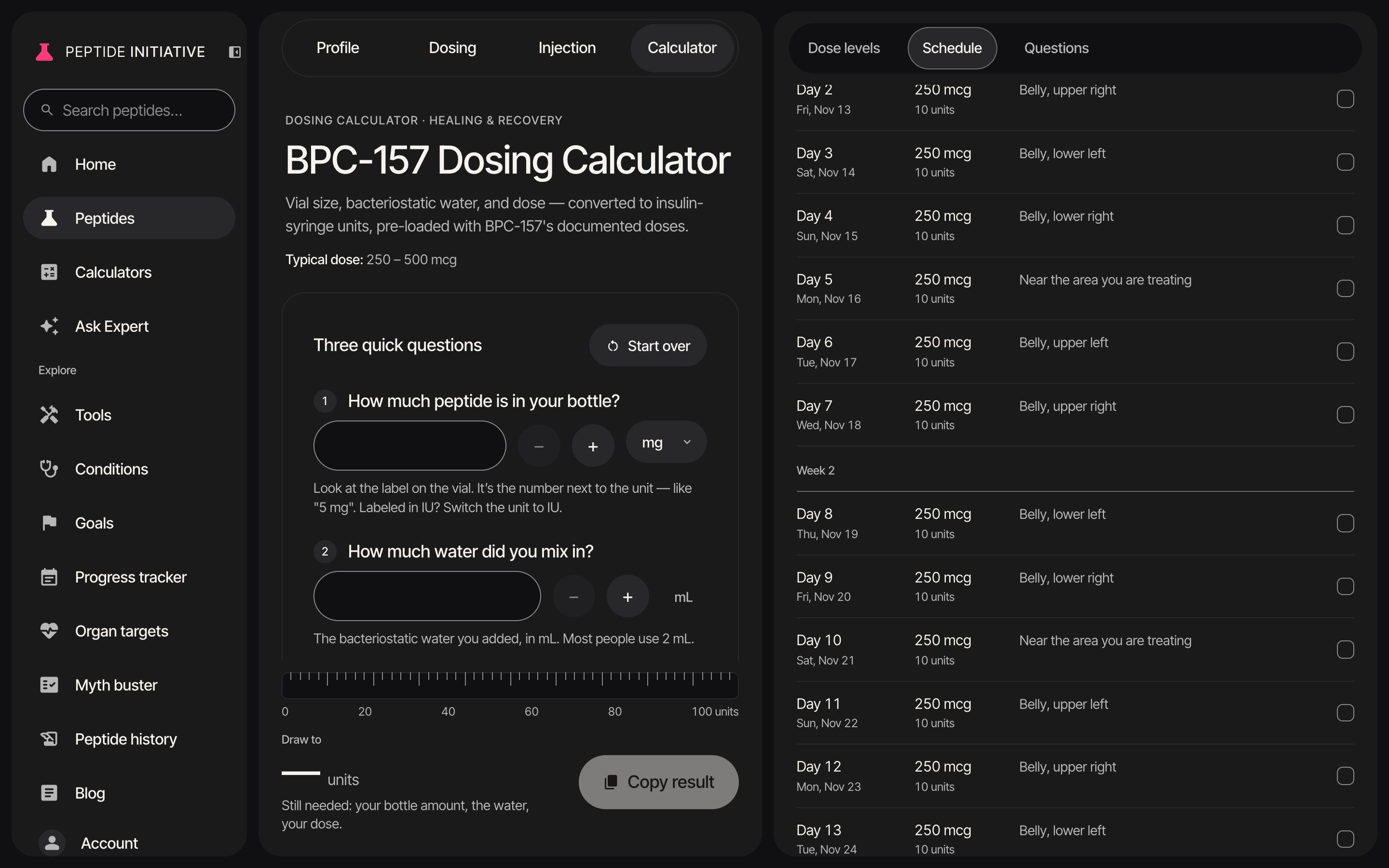
Lay out the schedule
- 1Press Schedule in the section bar
- 2A sample schedule, laid out day by day from BPC-157's documented dose levels
- 3Pick a documented regimen — here Weeks 4-6, twice daily. Every day redraws
- 4Each level fills in its documented dose and length. Change either and the schedule follows
- 5Change the dose: click it and type — or use − and +. On a phone, the schedule's numbers use the same keypad, one field at a time
- 6The summary: how many doses, over how many days, how many vials, and the total
- 7Day 1 is today until you pick a start date. The vial and water fill in from your calculator answers
Watch
The sample schedule
A documented regimen, laid out day by day — change a number and every day follows.
Tick off each dose
- 1Under Schedule, below the fields: the dose log, every dose week by week
- 2Each row: the day and its date, the dose and the units to draw, and an injection site
- 3Sites rotate from one dose to the next
- 4Tick Done as you take each dose — or tap anywhere on its row
- 5Ticks on a schedule you haven't saved stay in this browser only — save it as your protocol to keep them
Watch
The dose log
Day, dose, units and site for every injection, ticked as you go.
Print, send, or add it to your calendar
- 1Under Schedule, below the summary: Print it, send it, email it, or add it to your calendar
- 2Print… opens a print-ready copy in its own window
- 3Copy link (on a computer) copies a link to this schedule; Text… (on a phone) opens your messages with that link
- 4Email… opens your mail app with the whole schedule written in
- 5Add to calendar downloads a calendar file with every dose day. It needs a start date — day 1 is today until you pick one
Watch
Print, send, calendar
Four ways to take the schedule with you.
Good to know
- The schedule is built only from the peptide's documented levels. A level the documentation gives no fixed schedule for is listed but can't be picked, and a level with no fixed length shows its first 28 days and says so.
- A link to a schedule you haven't saved carries its numbers: whoever opens it sees the same days, view only. A link to a saved protocol opens the protocol as it is now.
- Until you save it, the schedule and its ticks live in this browser only. If your browser refuses to keep anything (site data blocked), the card says so — your changes and ticks go when you leave unless you save the protocol.
- A peptide's profile has a Build my protocol button in its dosing section; it opens this schedule.
- Print… opens a new window, so a browser that blocks pop-ups will say Print blocked — allow pop-ups for the site, or use Email.